Social DM leak
People comment, DM, ask for a link, and the lead gets lost before anyone follows up.
- Trigger keyword or message
- First reply and link or field collected
- Owner plus active-contact estimate
Conversation-Entry-Point Test
Use the entry point before the feature list: Manychat is the better first check when the conversation starts in comments or DMs; a website chatbot is better when visitors need answers from your site.
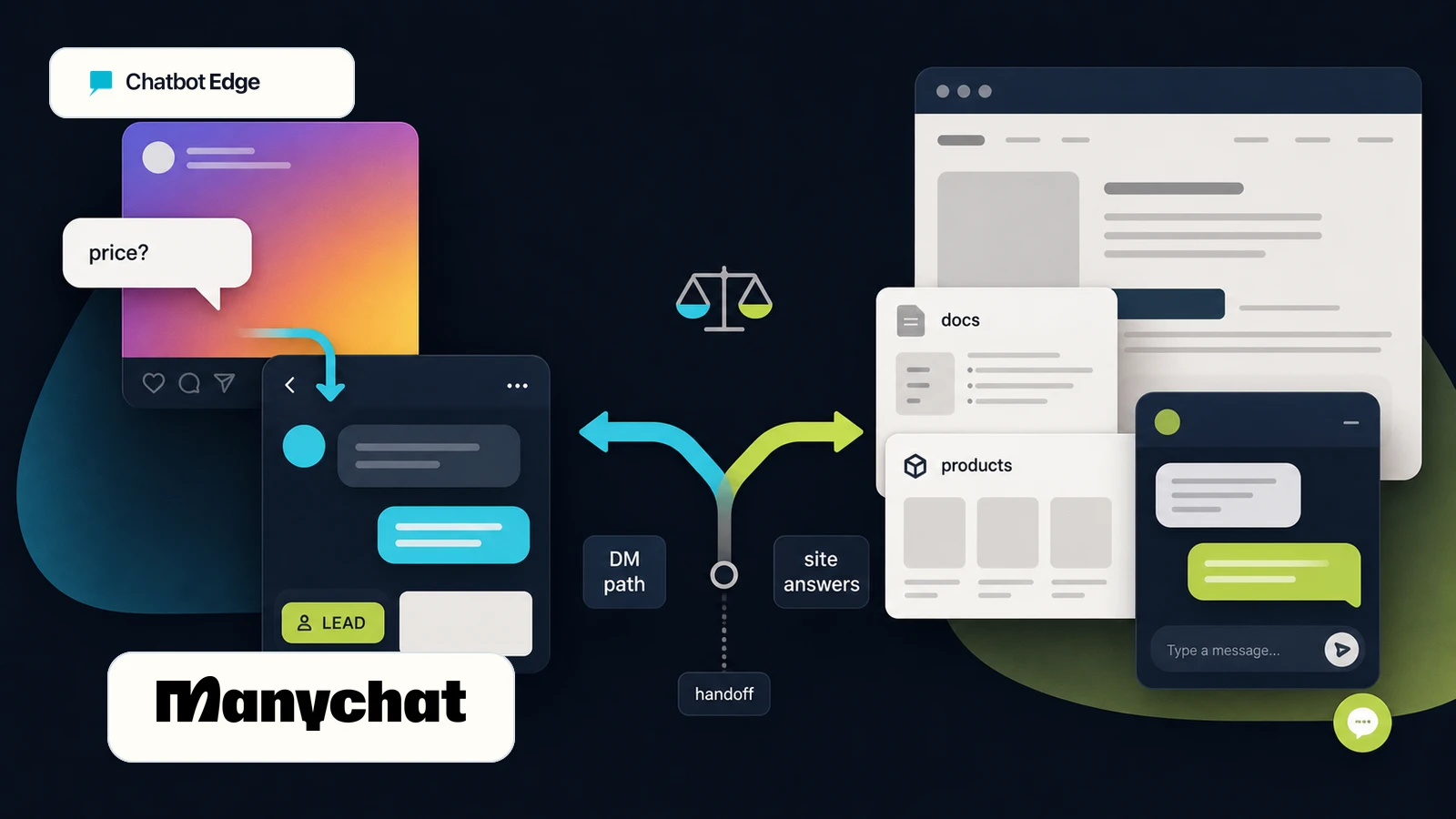
Choose Manychat first if your real problem is, "People comment, DM, ask for links, and then we lose them." Choose a website chatbot first if your real problem is, "People visit our site and cannot find a clear answer before they leave."
The mistake is treating both as the same thing. The Conversation-Entry-Point Test separates social conversations, website questions, and support-owner work before you compare plan names.
People comment, DM, ask for a link, and the lead gets lost before anyone follows up.
Visitors read a service, pricing, product, or policy page and leave because they cannot find the answer.
| Question | Manychat | Website chatbot |
|---|---|---|
| Best first check | Manychat, if people comment, DM, ask for links, or buy after a social conversation. | A website chatbot, if visitors ask questions on your site before they contact, book, buy, or request a quote. |
| Plain-English problem | We miss leads in Instagram comments, DMs, Messenger, or WhatsApp. | People land on our website and cannot find answers fast enough. |
| Training/source shape | Social channel automations, AI replies, flows, contact capture, tags, and inbox follow-up. | Website pages, help docs, PDFs, product information, policies, FAQs, tickets, and support handoff rules. |
| Main cost check | Active Contacts per month, channels, users, inbox seats, AI/add-ons, and overages. | Message credits, AI resolutions, source limits, chatbots, seats, handoff, content cleanup, and review time. |
Decision thresholds
Manychat and website chatbots are not priced or tested the same way. These thresholds help you choose the first trial path before you compare plan names or add more channels.
Social majority
Check Manychat first when the buyer already raises their hand in Instagram, Messenger, WhatsApp, TikTok, Telegram, SMS, or email before reaching your site.
Active-contact jump
Price Manychat Essential or Pro when social contacts are the growth path. If those people first needed website-page answers, inspect a site-trained chatbot before scaling DM traffic.
Website-answer breadth
Use a website chatbot first when answers depend on service pages, pricing pages, product details, policies, help docs, FAQs, or quote/request context.
Support workspace pressure
Do not force Manychat or a basic website bot into a support desk job. Inspect a support-workflow tool when people, tickets, and ownership are the real bottleneck.
Decision guide
Most buyers do not wake up asking for "DM automation" or "AI support orchestration." They want missed leads to stop leaking. This table keeps the buying decision in the language of the actual problem.
Problem
First check
Manychat
That conversation starts in a social channel. Manychat is built around comment replies, DMs, links, lead capture, and social follow-up.
Map one comment-to-DM offer before building a website chatbot.
Problem
First check
Website chatbot
That visitor needs answers from your site, services, products, policies, or support content. Start with a tool that can learn from those sources.
Use the plan finder or a website-chatbot comparison before opening a social automation tool.
Problem
First check
Manychat
Manychat's public pricing and help content frame contact capture, tagging, and follow-up as core social automation jobs.
Check the active-contact allowance and overage model before scaling a giveaway or lead magnet.
Problem
First check
Website chatbot
Manychat AI can use Knowledge entries, but the public help article notes links are added page by page. A website chatbot is usually the cleaner first check for full-site content.
Compare tools that learn from your site before assuming a social DM tool should answer site FAQs.
Problem
First check
Depends
Manychat can be a strong first check when the sale happens inside messaging. If the buyer starts on your website, keep the site-answer project separate.
Write down the first place the customer asks the question: post, DM, WhatsApp, or website.
Problem
First check
Depends
Manychat includes inbox and assignment concepts on higher plans, but support-led website teams may still need Tidio, ChatBot.com, Help Scout, Freshdesk, or another support workspace.
Choose by the team's daily inbox, not by the word chatbot.
Treat this as a trial shortcut, not proof that your account will deliver every message or qualify for any current offer. Check the current channel rules before buying.
Check ManychatStart with the exact job: answer from website content, hand off to support, capture leads, or handle ecommerce questions.
Compare website chatbot plansWhat we checked
This comparison uses current vendor documentation rather than a screenshot from our own account or a live deliverability test. Use the checklist to decide which workflow to prove first in your own account.
Social-DM path
When this path fits
Use this read when the buyer already asks for a link, price, size, coupon, or appointment in a comment, DM, Messenger thread, or WhatsApp chat.
Official docs checked
Public Manychat pricing and help pages show social channels, active-contact billing, comment/DM automation, AI replies, inbox seats, user seats, and channel limits.
Still untested here
A real account still has to prove Meta permissions, opt-in rules, trigger setup, reply quality, deliverability, and whether the owner can follow up before contacts go cold.
Draft before you trial
Write the trigger keyword, first DM, link or field collected, owner, and active-contact estimate before sending campaign traffic.
Website-answer path
When this path fits
Use this read when the buyer is already on a pricing, service, product, policy, quote, or help page and needs an answer without leaving the site.
Official docs checked
Public Chatbase, Tidio, and ChatBot.com docs show website or URL-based knowledge sources, file/manual knowledge options, source review controls, support handoff, tickets, seats, and AI-resolution or message-style usage units.
Still untested here
A real account still has to prove crawl coverage, answer accuracy, source freshness, handoff routing, ticket context, and whether the website content is good enough to train from.
Draft before you trial
List the URLs or docs to train from, five repeated questions, the handoff trigger, the owner, and the failure rule before comparing chatbot plans.
Website-chatbot source balance
Chatbase is the cleanest source-training reference on this page, but a website chatbot decision often becomes a support workflow decision. These extra vendor-doc checks keep the category side broader without turning this into a hands-on review of every tool.
Website crawling, sitemaps, individual URLs, files, text snippets, Q&A training, source review, auto retrain on higher plans, analytics, and helpdesk escalation actions.
Good reference for a site-trained answer project where content coverage and retraining matter.
Lyro data sources, website URLs, manual Q&A, CSV/PDF import, Zendesk imports, webstore product sync, source review, and live-agent handoff settings.
Good reference when the website bot also needs live chat, tickets, ecommerce context, and team ownership.
AI Knowledge sources from websites, articles, KnowledgeBase, and Zendesk, plus per-user plans, AI resolutions, live chat, shared inbox, ticketing, and human takeover.
Good reference when the buyer wants a website chat widget plus support workspace rather than only a page-trained answer bot.
Set it up safely
Do not start by buying the tool with the biggest feature list. Start by locating the first lost conversation. Then choose the smallest tool path that fixes that leak.
Use the Conversation-Entry-Point Test in this order: entry point, promise, source boundary, then pricing unit.
If the first question happens under a post or in a DM, Manychat deserves a look. If it happens on a service page, product page, pricing page, or contact page, start with a website chatbot.
Do not build a huge bot first. Build one useful path: send a link, collect a phone number, answer a repeated question, route a quote request, or hand a conversation to a person.
Manychat is strongest when the source is a social conversation and a flow. Website chatbots are strongest when the source is your site content, docs, policies, and product information.
For Manychat, watch active contacts and channel/user limits. For website chatbots, watch message credits, AI resolutions, seats, source limits, and handoff gates.
Messenger-specific next click
If the missed conversation starts in Facebook Messenger, inspect Manychat's Messenger product path directly. Keep the broader Manychat route for mixed Instagram, DM, WhatsApp, TikTok, email, or social automation research.
This is vendor-doc guidance, not a hands-on Messenger workflow test. Check your own Meta permissions, account setup, reply quality, and channel rules before sending campaign traffic through a flow.
Inspect Manychat MessengerPricing caution
Manychat's pricing model is built around monthly Active Contacts, and the bill can change with plan, channels, users, inbox seats, AI add-ons, billing country, and overage settings. Check the current plan page before sending campaign traffic through a flow.
Website chatbots usually have a different pressure point: messages, AI resolutions, pages crawled, sources, seats, handoff, branding, or ecommerce features. That is why "which one is cheaper?" is the wrong first question. Ask which unit grows when your campaign works.
Usage scenario
A creator expects about 300 people to comment or DM for a link during a launch week.
Manychat cost unit
Manychat's Free plan is too small for that contact shape because it includes 25 Active Contacts per month. Essential includes 250 Active Contacts; Pro includes 2,500.
Website-chatbot cost unit
A website chatbot may be the wrong first bill if those same 300 people never read the product page before asking for the link.
Owner and cleanup cost
Write the reply, link, field, owner, follow-up window, and transcript review rule before the launch. The cost is not just the plan; it is whether someone owns the hot replies.
Next check
Estimate monthly active contacts first, then inspect Manychat Essential or Pro before building a website FAQ project.
Usage scenario
A service business gets 700 monthly visits on pricing and service pages, with repeated questions about areas served, quote timing, policies, and handoff.
Manychat cost unit
Manychat may not see the real problem if most questions happen before the visitor ever opens a social channel.
Website-chatbot cost unit
Website chatbots expose different meters: message credits, AI resolutions, source size, workspace seats, AI Actions, auto-retrain, tickets, and handoff features.
Owner and cleanup cost
Budget time to clean the pricing and service pages, write five test questions, review failed answers, assign an owner, and decide when a chat becomes a ticket.
Next check
Count the repeated site questions, source pages, likely monthly messages, and support owner before sending visitors to a DM flow.
Next useful click
The fastest path is not more research. It is choosing the right surface for the first test: DMs and comments, or the website.
DMs and comments point toward Manychat; pricing, service, policy, and product pages point toward a website chatbot.
Manychat grows by active contacts, channels, users, inbox seats, and add-ons; website bots grow by messages, sources, seats, and handoff gates.
If multiple people need ticket context, assignment, or account changes, compare support-workflow tools before pushing either route too far.
Sources checked on June 7, 2026. Vendor documentation only.
FAQ
Start with the surface where the first question already lands. If buyers are commenting on Instagram posts, DMing for prices, replying to stories, or messaging on Messenger and WhatsApp, Manychat is the cheaper first trial because that is the job it was built for. If buyers are on your website reading service, product, pricing, policy, or help pages, a website chatbot wins the first trial because it can answer from those exact pages and hand off to a person without leaving the site. The mistake is forcing one surface to do the other's job, then blaming the tool when it does not.
Reviewed
Not in the same way. A trained website chatbot is built to ingest pages, files, sitemaps, help docs, and product content as its source of truth, then answer from that material with citations. Manychat 's strength is social conversation routing, DM automations, contact capture, tags, flows, and broadcasts — its AI features sit inside that flow context, not as a full-site answer layer. If the buyer wants a bot to answer every service page question, treat that as a website chatbot project; if the buyer wants a comment or DM to turn into a captured lead, that is Manychat's natural home.
Reviewed
Manychat and website chatbots usually meter different things, so the same monthly bill can come from very different volume. Manychat's pricing is shaped by monthly active contacts, selected channels, users, and add-ons. Website chatbots like Chatbase typically scale through message credits, AI agents, AI actions, training content size, and members per workspace — for example, Chatbase Hobby is $32/month billed annually with 500 message credits and 5 AI Actions per agent. Translate volume to the actual unit before comparing — a viral Instagram post can push active contacts up faster than a quiet website pushes message credits, and vice versa.
Reviewed · Sourced from Chatbase pricing page
Yes, when the customer journey actually splits across surfaces. Some buyers ask on Instagram or DM you about a product they saw in an ad — that path belongs to Manychat . Other buyers land on your service page from search and want to compare options, prices, and policies — that path belongs to a website chatbot. The two tools do not replace each other; they cover different leaks. The mistake is buying both before you have proved one. Start with the leak that is costing the most attention right now, run one narrow trial, then add the second surface only if a real second leak appears.
Reviewed
It depends on where the support conversation begins. Manychat is fine when the support thread starts in a DM and ends in a DM with a person stepping in. Website chatbots paired with a support workspace — Tidio , ChatBot.com , or a help desk — are stronger when support has to leave the page, become a ticket, route to an inbox owner, or get logged against a customer record. For most small teams the practical rule is: if the team works from a help inbox today, the website-chatbot-plus-handoff path matches the existing workflow; if the team mostly answers DMs on a phone, Manychat already matches reality. The [human handoff guide](/guides/which-ai-chatbots-support-human-handoff) breaks down the handoff types.
Reviewed
Decision recap