Step 1
Decide what counts as a lead
Write down the moment a chat should become a lead: quote request, callback request, demo request, booking enquiry, or urgent support issue.
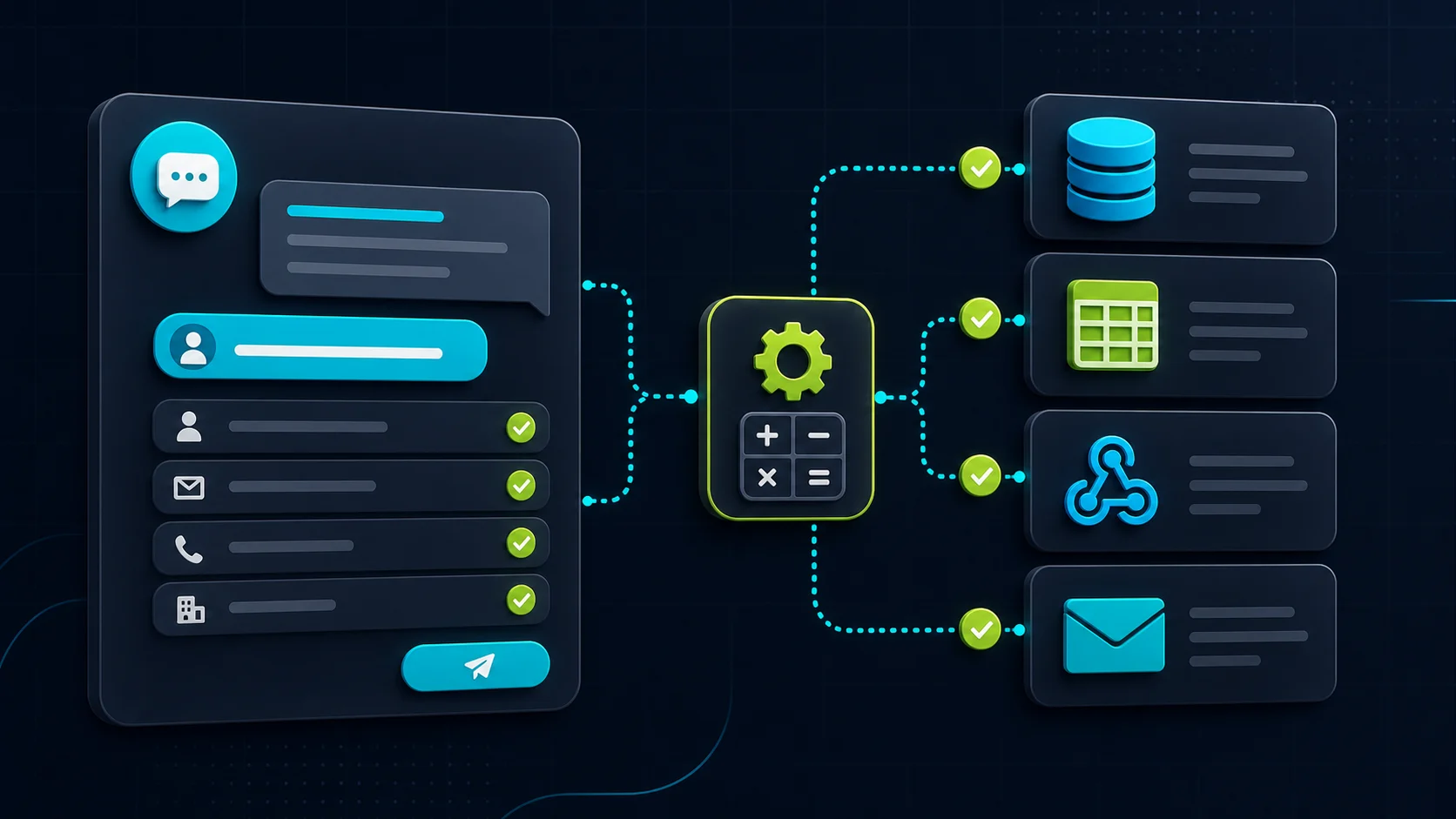
Capture-Route-Act-Write
Start with a useful lead brief, send it to the right person, then add Zapier, Make, webhooks, or CRM writes only after the handoff works.
What the visitor needs
What the chatbot should collect
Safe for the chatbot
A useful lead route that stays honest about what has and has not been proven.Needs a person or approved process
No silent CRM update, booking, quote, payment, account change, or customer promise without a tested workflow and failure path.The safest chatbot-to-CRM setup is not "connect everything and hope." Start with a lead brief: who the visitor is, what they need, how urgent it is, and where the request came from. Send that somewhere a person already checks.
Once the brief is clean, you can route it through Zapier, Make, a webhook, or a CRM. Do the CRM write last. Creating or updating a customer record is higher risk than sending a notification, because bad fields can make follow-up worse instead of faster.
Plain-English rule: use the Capture-Route-Act-Write test. Capture useful fields, route a readable brief, act only on tested workflow paths, and write to the CRM last because that changes the customer record.
Step 1
Write down the moment a chat should become a lead: quote request, callback request, demo request, booking enquiry, or urgent support issue.
Step 2
Ask for the details your team actually needs: name, email or phone, what they need, where they are, urgency, and the page or product they came from.
Step 3
Before a CRM write, send the lead summary to one owner, inbox, spreadsheet, or test list so a person can confirm the data is clean.
Step 4
Once the brief works, map the fields into the workflow tool and test normal leads, messy answers, missing fields, and duplicates.
Step 5
Treat CRM creates and updates as the final step, because broken mapping can damage the sales record your team relies on.
Setup fit
A chatbot can have a Zapier trigger, a Make scenario, a webhook notification, an API action, and a CRM handoff. They are not the same level of risk. First prove the visitor gave you useful fields. Then prove the team receives them. After that, test the workflow and CRM mapping with fake leads before using real sales records.
Proof checks
Capture-Route-Act-Write
Capture
Route
Act
Write
Worked example
This is a planning example, not a live CRM test. A small support team should send the chatbot lead to a sales inbox or test list first, review the field map, and only then allow a CRM create or update.
| Chatbot field | Example value | Workflow destination |
|---|---|---|
| Lead source | Pricing page chatbot | CRM lead source or note |
| Contact | Mia Chen, mia@example.test | Contact name and email |
| Need | Wants a quote for a 12-seat support chatbot | Opportunity or lead description |
| Urgency | This month | Priority tag or follow-up task |
| Owner | Sales inbox first, CRM write after review | Assigned owner and approval step |
Before you build
Inspect first for actions
In-chat actions plus lead capture
Start here if
Teams that want content-grounded answers plus Collect Leads, webhooks, Zapier lead submission, and documented custom-action options for more advanced API workflows.Before you choose
Do not treat the action menu as proof of safe CRM writes. Test authentication, field mapping, returned responses, failures, duplicate handling, and plan limits before touching production records.Good simple-site path
Lead routing and simple automations
Start here if
Small websites and WordPress sites that want source-backed answers, lead capture, Zapier or Make routing, and a practical handoff path without building a full support workspace.Before you choose
Separate ordinary lead-routing workflows from in-chat action claims. Check current paid plan access, message credits, live chat, workflows, and the exact Zapier/Make path before buying.Support inbox fit
Flow-to-Zapier and Lyro Actions
Start here if
Businesses that want chatbot leads to sit inside a broader live chat, support, contacts, and flow workflow, with Lyro Actions or Flow actions for API-style integrations.Before you choose
Flow-to-Zapier data depends on what the flow collected, and Lyro Actions should be tested in the editor before going live. Verify current package access before assuming automation is included.Best for flow builders
Flow builder, attributes, and webhooks
Start here if
Teams that prefer mapped bot flows with Question actions, saved attributes, Add to leads, Zapier, Make, and webhook paths around a LiveChat-style support workspace.Before you choose
Designed-flow automation is different from AI deciding when and how to write to a CRM. Prove the scenario step, attributes, webhook response, and failure behavior before relying on it.Workflow path
The visitor asks about price, fit, availability, support, booking, product details, or a callback before their information is ready for a clean form.
Good automation starts with named fields: contact, need, urgency, location, source page, product or service, and the transcript.
The configured workflow sends the data to the right place, runs a lookup, or returns a result to the chat only when that exact path is documented and tested.
System writes, quotes, bookings, account changes, and unusual requests should have an alert, fallback, and a person or approved workflow responsible for the outcome.
Test before launch
Does the chatbot collect the minimum fields the destination needs?
Name, email, need, source page, urgency, location, and consent where relevant.
What happens with typos, missing emails, vague answers, duplicate contacts, or multiple requests in one chat?
The workflow should ask one repair question or route to a person, not silently create broken records.
Does the automation only create a new lead, or can it update an existing contact, deal, ticket, or appointment?
Updating systems has higher risk than sending a new lead notification.
Does the outside system send a result back to the visitor, or is the automation only a back-office notification?
Do not promise in-chat lookups unless the return path is proven.
Who knows when Zapier, Make, a webhook, API key, CRM field, or rate limit fails?
A quiet failure is worse than a manual handoff.
Workflow proof
Send an owner-ready brief to email, Slack, Teams, a support inbox, a spreadsheet, or a CRM owner when fields and fallback rules are clear.
Use Zapier, Make, or webhook steps to move collected chatbot fields into a reviewed downstream workflow.
Let an action fetch a status, availability, estimate, or account-safe result only when the exact action and returned message have been tested.
Anything that creates or changes customer records, bookings, deals, invoices, refunds, payments, orders, or accounts needs stricter proof.
A tested calculator can show an approved ballpark estimate, but free-form model pricing, discounts, availability, dispatch, or delivery promises need review.
Legal, medical, financial, safety, security, emergency, insurance, and regulated cases should route quickly to a qualified person.
Related guides
Sources checked
Product details and plan gates change. Use these as starting points, then check current vendor docs before relying on a chatbot to collect fields, send Zapier or Make payloads, call an API, return results to chat, write to a CRM, book appointments, or make customer promises.
FAQ
Start by sending a readable lead brief to an owner, inbox, or test list. After the fields are clean, add Zapier, Make, or a webhook. Treat CRM creates and updates as the final step because they can change the sales record.
Reviewed
Not automatically. Zapier support may mean lead routing, a trigger, a designed flow step, or an action. CRM creates and updates need field mapping, permissions, duplicate handling, fallback alerts, and a live workflow test.
Reviewed
Usually no. Send a readable lead brief to an owner, inbox, sheet, or test CRM list first. Add CRM creates or updates only after field mapping, duplicate handling, ownership, and failure alerts are tested.
Reviewed
The safest first project is usually answering repeat questions and collecting better lead or support details, then handing the conversation to a person when the answer affects money, time, customer records, or trust.
Reviewed
Official docs show lead routing and integration paths, but safe CRM creates or updates still need a workflow test for required fields, duplicate handling, permissions, owner assignment, and failure alerts.
Reviewed
Decision recap